

Subscription Management
The Subscription page shows your current AutoPubliX plan, usage against plan limits, payment history, and upgrade options. AutoPubliX offers three plans: Free, Creator, and Growth.
Use this page to confirm renewal dates, cancel when needed, download invoices, compare limits before changing plans, and — if you still bill through Razorpay — migrate to Paddle.
To open this page, navigate to:
Navigation: Dashboard → SubscriptionSubscription is an owner-only area. When you are managing another account through Share My Access, the Subscription menu is hidden and visiting the page redirects you to the dashboard.
What You Can Do on This Page
The product title is Subscription Management. Tabs depend on your plan and billing provider:

- Current Plan — active subscription, usage, and cancel / upgrade actions
- Payment History — past payments and invoice downloads
- Paddle Credit — shown when you have account credit from proration or related billing adjustments
- Upgrade Plan — change plan tier or monthly ↔ yearly billing
Subscriptions purchased through the App Store or Google Play are managed on the device — the Upgrade Plan tab is hidden on web for those accounts.
Current Plan
The Current Plan tab shows your active subscription status (for example ACTIVE or TRIALING), plan name, billing interval, Start Date / Renews on (or Expires on), and price.
Usage and connection details include:
- Social media accounts (Facebook, Instagram, X, LinkedIn)
- Direct Messages used vs plan limit
- Forms and Link in Bio pages
- AI tokens and media storage
Common actions:
- Cancel Subscription — for paid plans, cancels at the end of the current billing period. You keep access until then and can Reactivate while the period is still active.
- Cancel Trial — ends the free trial immediately, moves you to Free, and avoids a charge. Each account gets one free trial.
- Upgrade to Annual Plan — jumps to the Upgrade Plan tab with yearly billing selected.
There is no Pause Subscription control on this page.
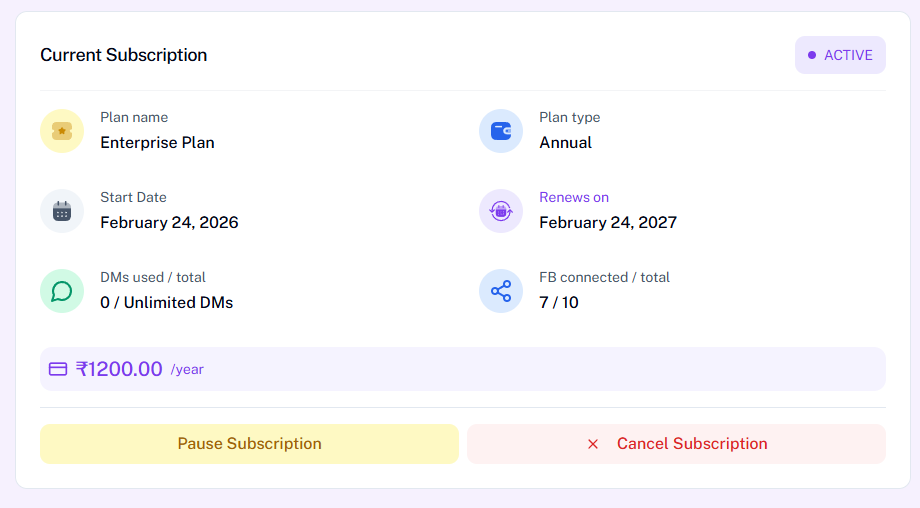
Cancel Subscription
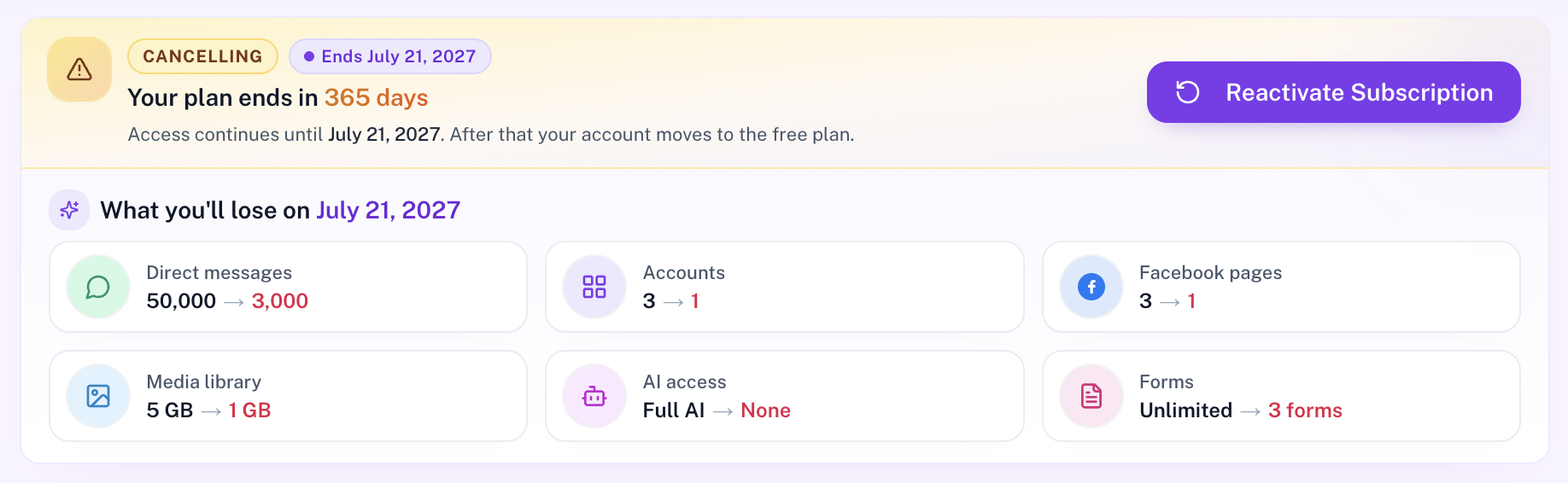
When you cancel a paid plan, AutoPubliX schedules the change for the end of the current billing period. The Current Plan tab shows a CANCELLING badge, the end date, and how many days of access remain.
You keep your paid features until that date. After it ends, the account moves to the Free plan. A What you'll lose summary compares paid limits (DMs, accounts, Facebook pages, media library, AI access, forms, and more) with Free plan limits.
Use Reactivate Subscription anytime before the end date to keep your paid plan and cancel the scheduled downgrade. This is different from Cancel Trial, which ends immediately with no charge.
Free Trial
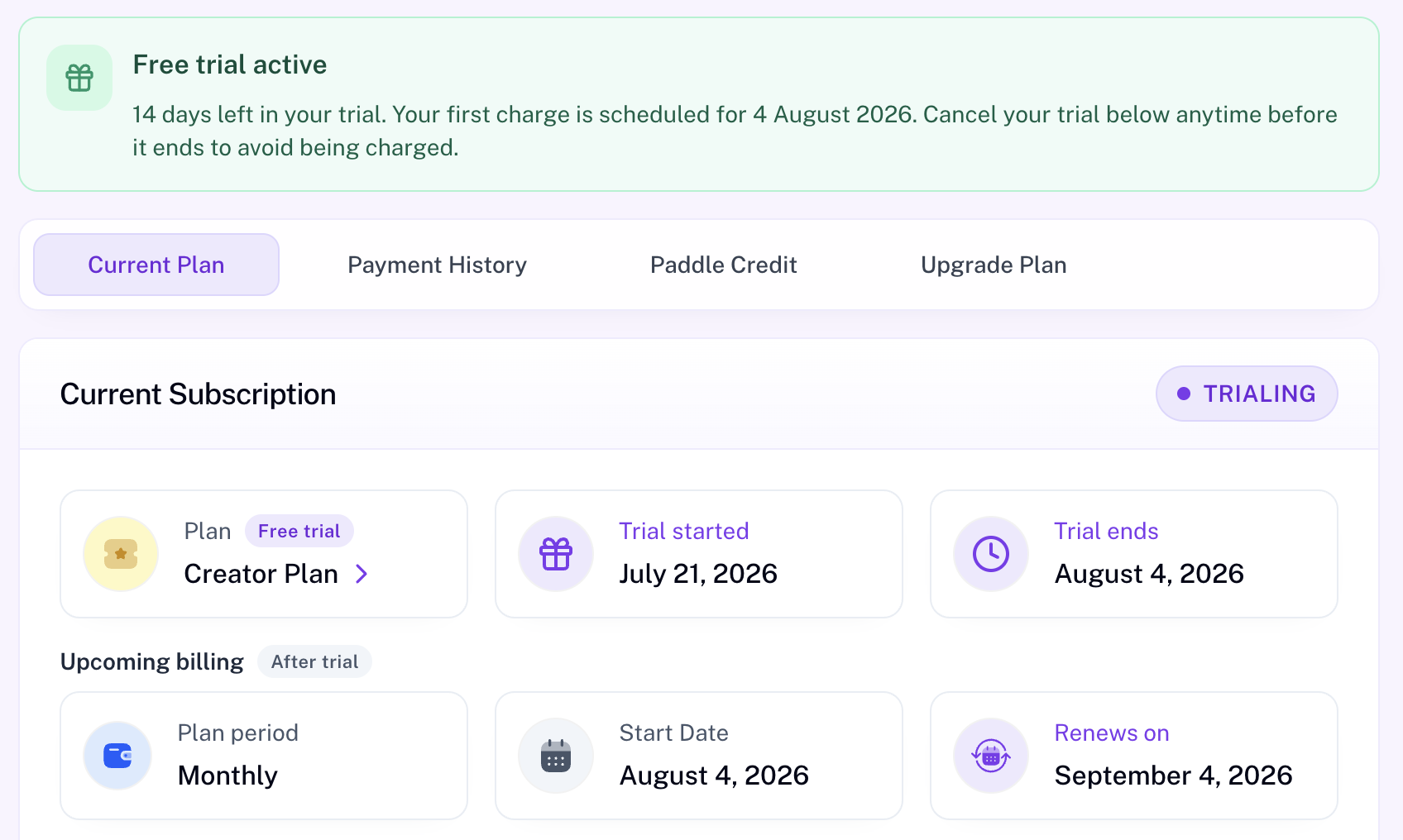
During a free trial the Current Plan tab shows a free-trial banner (days remaining and first charge date), a TRIALING status badge, trial start and end dates, and an Upcoming billing section for after the trial.
Use Cancel Trial anytime before the trial ends to avoid being charged — the trial ends immediately and your account moves to Free. Upgrading while trialing typically does not charge today; billing starts when the trial converts to a paid period. Paid-plan Rewards points unlock only after the first successful paid charge.
After you move to Free
If you previously had a paid plan and move to Free (for example after cancel or refund), excess social logins (any platform), Facebook pages, media, forms, and premium automations can become plan-locked. They stay in your account but pause until you upgrade or free a slot. Details: Settings → Social Connections and Troubleshooting.
Payment History
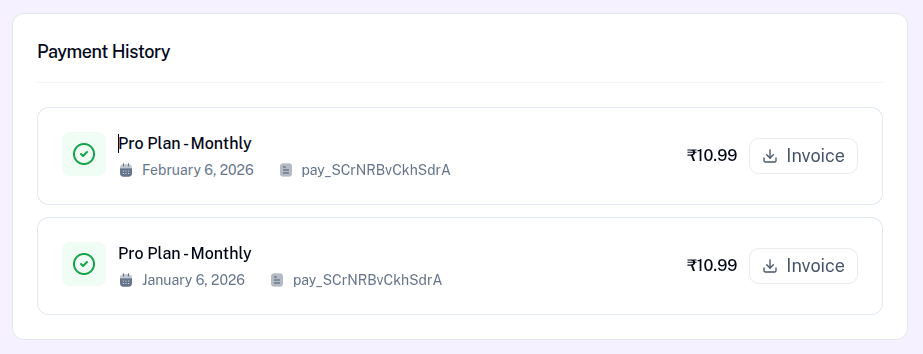
The Payment History tab lists completed subscription payments. Summary totals show overall payments and the last payment. Each row typically includes plan label, date, receipt / invoice reference, payment method, amount, and status.
Where available, use Invoice to download the official invoice for accounting. Free-trial rows and some mobile-store payments may not offer an invoice download.
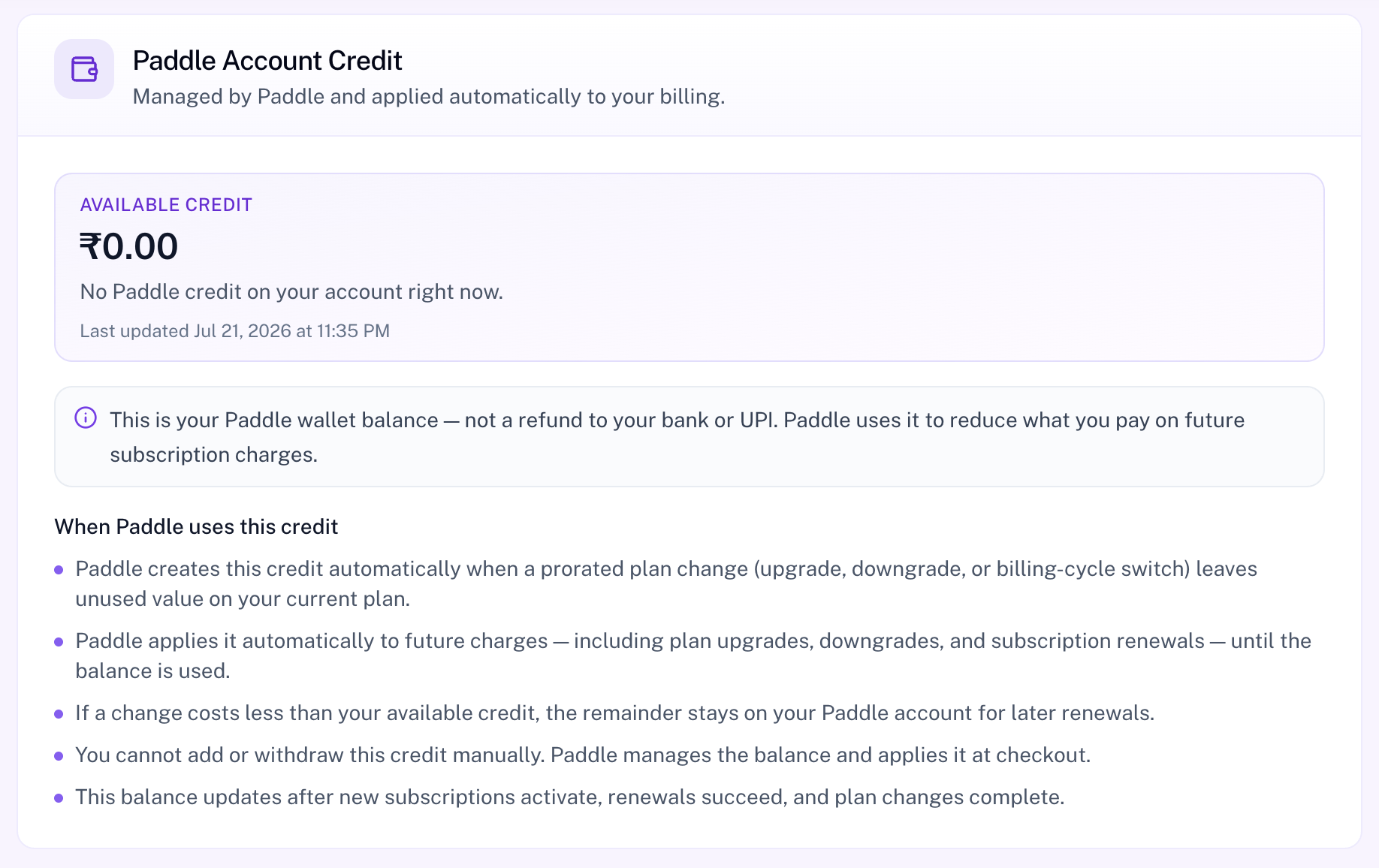
Paddle Credit
The Paddle Credit tab shows your Paddle Account Credit — a wallet balance managed by Paddle and applied automatically to billing. This is not a refund to your bank or UPI; Paddle uses it to reduce what you pay on future subscription charges.
Credit is created automatically when a prorated plan change (upgrade, downgrade, or billing-cycle switch) leaves unused value on your current plan. Paddle applies it to future charges until the balance is used. You cannot add or withdraw this credit manually.
Upgrade Plan
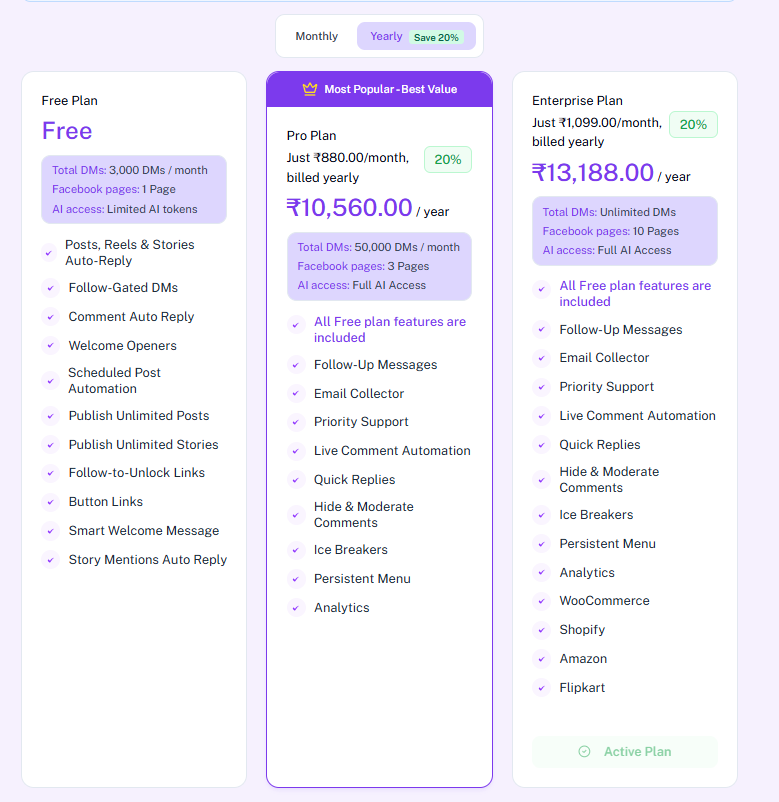
The Upgrade Plan tab lets you switch between Free, Creator, and Growth, and between Monthly and Yearly billing. Yearly billing is labeled 2 months free (pay for 10 months, get 12).
Plan cards show your current plan as Active Plan (or Free Trial Active). Other cards offer upgrade or downgrade actions. On Paddle, plan changes usually prorate immediately. Downgrades are available for Paddle subscriptions and are blocked while a Razorpay→Paddle migration is scheduled.
Confirm dialogs can show Rewards points and Paddle credit that will apply to the change.
- Free — starter limits for exploring AutoPubliX
- Creator — higher DM and AI limits, more social slots, Share My Access, analytics, and advanced automation types
- Growth — highest limits, including unlimited monthly DMs and WooCommerce / Shopify store connections
Migrate from Razorpay to Paddle
If you still bill through Razorpay, Subscription shows a migration banner such as Migrate from Razorpay to Paddle with a +10,000 pts badge and a Move to Paddle button.

Clicking Move to Paddle opens the migration modal. It confirms the same plan with a new billing provider, shows when your current period ends and when Paddle billing starts, and notes that the charge today is ₹0 / $0 with +10,000 points pending.
- Authorize your Paddle payment method — secure checkout, nothing billed until your Razorpay period ends.
- Razorpay stays active until period end — full access continues, no double billing.
- Razorpay cancels automatically — scheduled for the end of the current cycle, not immediately.
- Paddle takes over billing — renews the same plan when the Razorpay period ends.
- Earn 10,000 bonus points — 10,000 points are added to your history as Pending when migration is scheduled. They become available when Paddle billing starts.
Use Continue — ₹0 today to proceed, or Cancel to close the modal. While migration is scheduled you may see Migration in progress and can Cancel upcoming plan if needed. Points stay pending until Paddle billing starts.
Plan Limits Comparison
The table below summarizes the main usage limits for each plan. Use it to compare Free, Creator, and Growth before you upgrade.
| Limit | Free | Creator | Growth |
|---|---|---|---|
| Media storage | 1 GB | 5 GB | 10 GB |
| Monthly DMs | 3,000 | 50,000 | Unlimited |
| Monthly AI tokens | 4,000 | 10,000 | 20,000 |
| Facebook pages | 1 | 3 | 10 |
| Social account slots (IG / X / LinkedIn / FB login) | 1 | 3 | 5 |
| Forms | 3 forms (50 newest submissions visible) | Unlimited | Unlimited |
| Link in Bio pages | 1 page (cannot set primary) | Unlimited (can set primary) | Unlimited (can set primary) |
| Generic templates (selectable in automations) | 0 (none) | 3 | 10 |
| Share My Access invitations | Not available | 5 | 5 |
| Store connections (WooCommerce / Shopify) | Not available | Not available | Available |
Billing Options & Active Plan
Creator and Growth support Monthly and Yearly billing. Yearly plans use the 2 months free incentive — pay for 10 months and get a full year. Plan cards mark your current selection with Active Plan (or Free Trial Active during a trial).