

Story Mentions Automation
To create this automation, go to the All Automation page and click New Automation. From the available templates, select the Story Mentions automation template. After opening the template, you can configure the automation settings as described below.
To open this page, navigate to:
Navigation: Dashboard → All Automations → New Automation → Story MentionsWhat You Can Do on This Page
The Story Mentions Automation feature allows you to automatically send a Direct Message (DM) to users when they mention your account in their story. This automation helps you quickly respond to users who tag or mention your account in their stories, making it easier to acknowledge engagement, share helpful resources, or build stronger relationships with your audience.
This helps you instantly respond to engagement without needing to manually check every story mention.
Platform & Connections
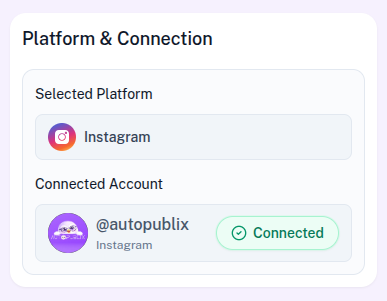
In this section, the selected platform will already be configured based on the template you chose. The automation can run on either Instagram or Facebook.
If the platform connection shows as disconnected, you can reconnect your account by going to the Settings page.
Below that, you will see the Connected Account setting. Here, you need to select the account where the automation should run.
For Instagram, select which connected account should run this automation. Your plan allows up to 1 Instagram login on Free, 3 on Creator, and 5 on Growth. Accounts beyond your plan stay connected but show as plan-locked — choose an unlocked account or upgrade before activating.
For Facebook, select the page where story-mention replies should run. Pages beyond your plan page limit stay connected but can be plan-locked — choose an unlocked page or upgrade before activating.
Automation Title
The Automation Title helps you organize and manage automations within the AutoPubliX dashboard.
You can assign a descriptive title that clearly explains the purpose of the automation. For example, the title can describe the options you offer, such as Story Mention Auto Reply,Thank You for Story Mention, or Story Tag Response. Using clear titles makes it easier to identify and manage multiple automations later.
How This Automation Works
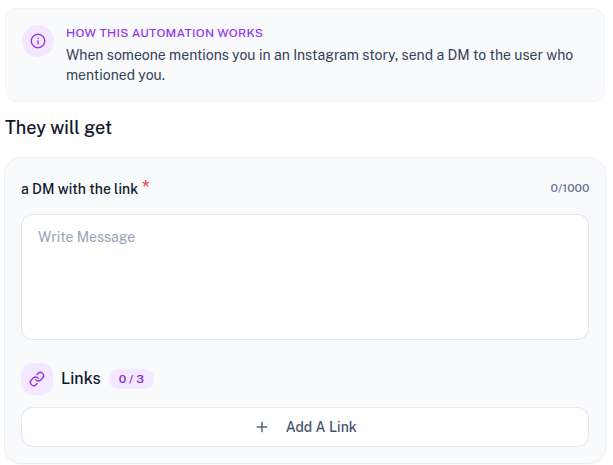
This automation is triggered when someone mentions your account in their story. Once the system detects the mention, it automatically sends a Direct Message to the user who mentioned you.
This helps you acknowledge engagement instantly without manually checking every story mention.
They Will Get
This section defines the message that users will receive after mentioning your account in their story.
A DM with the Link
Here you can write the message that will be sent to the user via Direct Message. The message can include a thank-you note, additional information, or instructions related to your content.
For example, you might thank the user for mentioning your account and share a helpful resource, guide, or product link.
Links
You can attach up to three links to the message sent through this automation.
Each link includes:
- Link Title : The title of the link that will be displayed to the user.
- Link URL : The URL of the link that will be clicked by the user.
These links can point to websites, landing pages, Google Docs, PDF files, product pages, or other resources you want to share with users who mention you in their stories.
To add a link, click Add A Link and fill in the required details.
Automation Action
This section controls the status of the automation and determines whether it is active or inactive.
- Draft : The automation is saved but remains inactive. It will not trigger until activated.
- Save and Deactivate : The automation is saved but not available for users yet.
- Save and Active : The automation becomes live immediately. When someone mentions your account in their story, the automation will automatically send the predefined DM message along with the attached links.