

Points History
The Points history page is the full ledger for your rewards wallet. It shows every earn, redemption, clawback, and rollback activity so you can audit how your balance changed over time.
To open this page, navigate to:
Navigation: Dashboard → Rewards → Points historyUse Back to rewards to return to the Rewards hub.
What You Can Do on This Page
- Browse all wallet transactions in date order
- See the source of each entry (welcome bonus, referral, redemption, and more)
- Check type and status for each movement of points
- Page through results when you have more than 10 entries
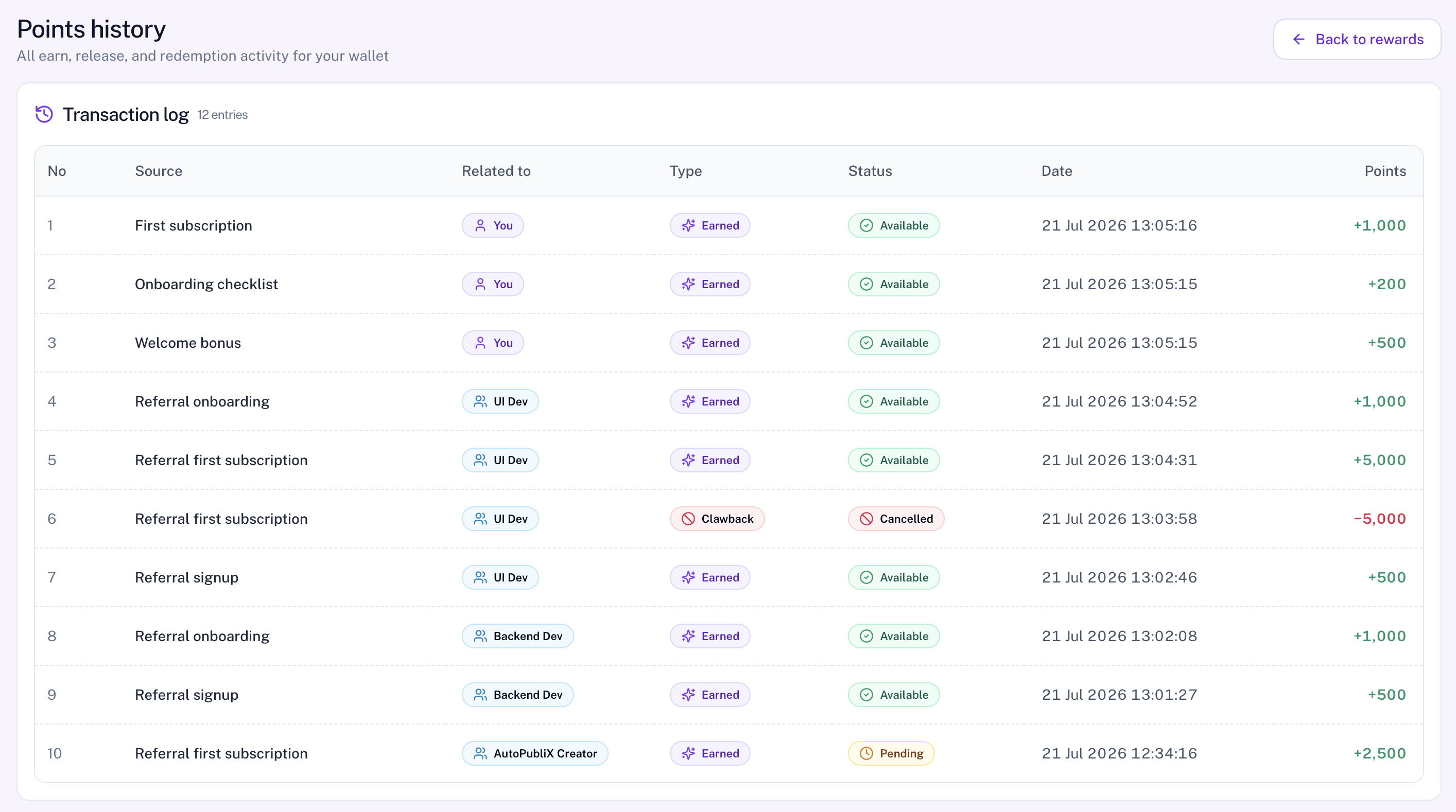
Transaction Log
Each row in the history table includes:
- No — row number
- Source — for example Welcome bonus, Referral signup, Referral onboarding, Referral first subscription, First subscription, Onboarding checklist, Paddle migration, Points redemption, or Admin adjustment
- Related to — usually You, a referred friend's name, or — when no party applies
- Type — Earned, Redeemed, Clawback, or Rollback (Released may appear as a label when pending points unlock)
- Status — Pending, Available, Used, Cancelled, or Rolled back. Redeemed rows can show Pending while points are reserved for an upcoming bill, then Used after the charge succeeds.
- Date — when the activity happened
- Points — positive for earn/rollback, negative for redeem/clawback
If you have no activity yet, you will see No points activity yet. Complete milestones or refer friends to start building history.
History paginates at 10 entries per page. There are no filters or tabs on this page — use pagination to move through older activity. Available points do not expire; pending rewards can still be cancelled if eligibility is lost.
Understanding Types
- Earned — points added for a milestone (may start as Pending, then move to Available when unlocked)
- Redeemed — points reserved for billing (Pending) or confirmed on a successful Paddle charge (Used)
- Clawback — points removed (for example after a cancelled reward)
- Rollback — a previous redemption was reversed (for example an abandoned checkout)
When pending points unlock, the same earn row usually changes status to Available rather than creating a separate Released transaction.
Understanding Status
- Pending — earned points not yet ready to use, or redeemed points reserved for an upcoming bill
- Available — points ready to apply on eligible Paddle bills (including after a pending unlock)
- Used — points already applied to a bill
- Cancelled — points removed or voided (for example after a clawback)
- Rolled back — a previous redemption was reversed
Related Pages
- Rewards — current wallet totals
- How to earn points — milestone amounts and timing
- Your referrals — friends who used your link
- Subscription — where points can apply on Paddle billing