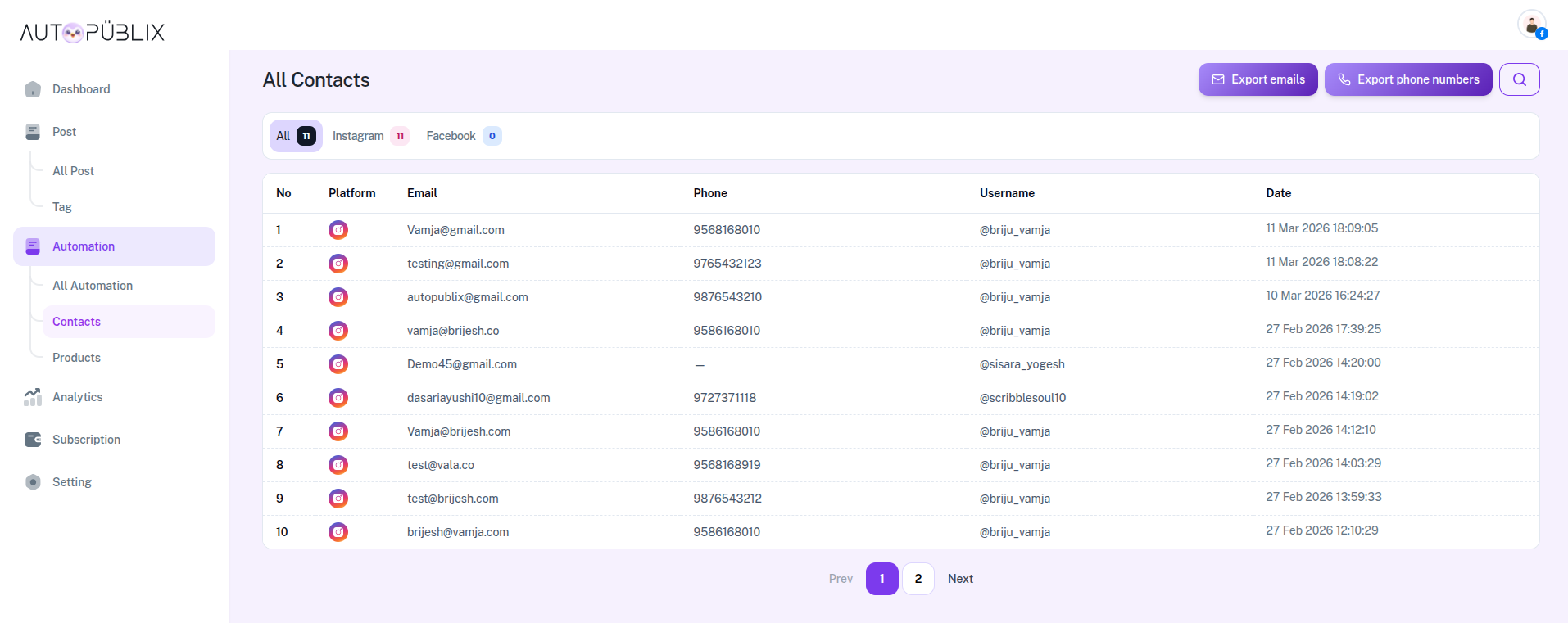
All Contacts

The All Contacts page allows you to view and manage all user contact information collected through your automation workflows. This includes email addresses, phone numbers, usernames, and the platform where the contact originated.

Contacts are automatically stored when users share their information through automation flows such as email collection or phone number collection during Direct Message interactions.

To open this page, navigate to:

Navigation: Dashboard → Automation → Contacts

What You Can Do on This Page

On this page, you can view and manage all contacts collected from your automations in one centralized list. This helps you track users who interacted with your automations and shared their contact details.

You can easily see which platform the contact came from, their email address, phone number, username, and the date when the information was collected.

The page also provides filtering options, search functionality, and export tools that allow you to download collected contact information for further use in marketing, communication, or customer management.

This makes it easier to maintain a structured database of your audience and follow up with them outside of the automation system if needed.

All Contacts

Contact Filters

At the top of the page, you will see filtering options that allow you to view contacts based on the platform.

Available filters include:

  • All: Displays all contacts collected from every platform.
  • Instagram: Shows only contacts collected from Instagram automations.
  • Facebook: Displays contacts collected from Facebook automations.

These filters help you quickly analyze contacts from specific platforms.

Contact List

The main section of the page displays a table containing all collected contacts.

Each contact entry includes the following details:

  • No: A serial number assigned to each contact in the list.
  • Platform: Shows the social media platform where the contact interaction occurred (Instagram or Facebook).
  • Email: Displays the email address provided by the user during automation interaction.
  • Phone: Shows the phone number provided by the user during automation interaction.
  • Username: Displays the social media username of the user who interacted with the automation. you can click on the username to view the user's profile on the social media platform.
  • Date: Shows the exact date and time when the contact information was collected.

This table allows you to quickly review and manage user information collected through automation workflows.

Search Contacts

The Search feature allows you to quickly find specific contacts.

You can search using:

  • Email address
  • Username
  • Phone number

Simply type the keyword into the search bar, and the system will instantly filter the results to display matching contacts.

This is especially useful when managing a large number of collected contacts.

Export Contacts

The All Contacts page also provides options to export collected contact information.

Two export options are available at the top of the page:

  • Export Emails: Downloads all collected email addresses in TXT format.
  • Export Phone Numbers: Downloads all collected phone numbers in TXT format.

These exported files can be used for external marketing tools, CRM systems, or customer follow-up campaigns.

Important

Contacts appear in this section only when users share their information through automation flows such as:

  • Ask for Emails
  • Ask for Phone Number

If these options are not enabled in your automation settings, no contact information will be collected or displayed on this page.

All contact data shown here is automatically captured during user interactions and stored securely inside the AutopubliX system.

Meta

Secure Instagram & Facebook Automation

POWERED BY OFFICIAL META APIS
Official Meta API Integration
Secure OAuth Login
No Automation Bots

AutoPubliX helps creators and marketers automate engagement safely without sharing passwords.

Trusted By 5,000+ Creators And Marketers