

Hide/Remove Moderate Comments Automation
To create this automation, go to the All Automation page and click New Automation. From the available templates, select the Hide / Moderate Comments automation template. After opening the template, you can configure the automation settings as described below.
This template is available on Creator and Growth . On Free it stays plan-locked; after a downgrade, existing Hide/Moderate automations deactivate until you upgrade again.
To open this page, navigate to:
Navigation: Dashboard → All Automations → New Automation → Hide Moderate CommentsWhat You Can Do on This Page
The Hide / Moderate Comments Automation feature allows you to automatically manage unwanted, spam, or inappropriate comments on your posts and reels. With this automation, comments that match specific filters can either be hidden from public view or permanently removed.
This feature is designed to help maintain a clean and professional comment section by automatically filtering comments that contain spam keywords, offensive language, or irrelevant content. Once the automation is activated, it continuously monitors comments on your selected content and applies the configured moderation rules instantly.
Platform & Connections
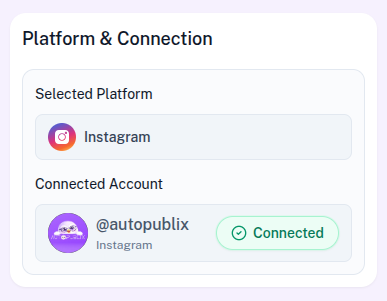
In this section, the selected platform will already be configured based on the template you chose. The automation can run on either Instagram or Facebook.
If the platform connection shows as disconnected, you can reconnect your account by going to the Settings page.
Below that, you will see the Connected Account setting. Here, you need to select the account where the automation should run.
For Instagram, select which connected account should run this automation. Your plan allows up to 1 Instagram login on Free, 3 on Creator, and 5 on Growth. Accounts beyond your plan stay connected but show as plan-locked — choose an unlocked account or upgrade before activating.
For Facebook, if you manage multiple pages, you must select the specific page where the automation should be applied. One page may already appear as the default page, based on the settings configured in the Connection Platform tab.
Automation Title
The Automation Title helps you organize and manage automations within the AutoPubliX dashboard.
You can assign a descriptive title that clearly explains the purpose of the automation. For example, the title can describe the options you offer, such as Spam Comment Filter, Instagram/Facebook Comment Moderation, or Offensive Keyword Filter. Using clear titles makes it easier to identify and manage multiple automations later.
How This Automation Works
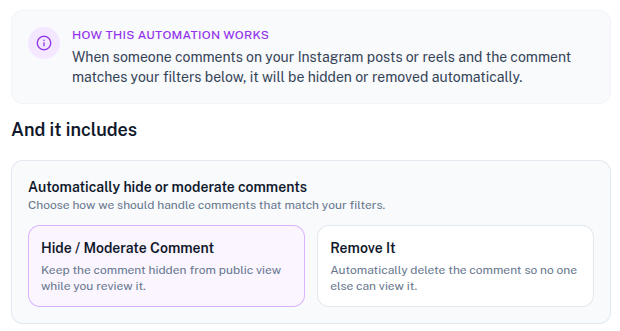
The automation continuously monitors comments on your posts and reels. When someone leaves a comment that matches the filters you configure, the system automatically applies the moderation action you selected.
This helps you manage comments without needing to manually review every interaction.
And It Includes (Moderation Action)
This section allows you to define how the system should handle comments that match your moderation filters. Two moderation options are available.
Hide / Moderate Comment
When this option is selected, comments that match your filters will be hidden from public view. The comment will still exist, but it will not be visible to other users on the post.
This option is useful when you want to review comments later before deciding whether to remove them permanently.
Remove It
When this option is selected, the comment will be automatically deleted as soon as it matches the moderation filters. Once deleted, the comment will no longer appear on the post or reel.
This option is ideal for spam comments, offensive language, or unwanted promotional content that should be removed immediately.
Automation Action
This section controls the status of the automation and determines whether it is active or inactive.
- Draft : The automation is saved but remains inactive. It will not trigger until activated.
- Save and Deactivate : The automation is saved but not available for users yet.
- Save and Active : The automation becomes live immediately. When comments that match the defined moderation filters are detected, the automation will automatically apply the selected moderation action.